Do you want to improve the presentation at the exhibition?
USE PRESENTATION MODE
Once the presentation is finished, or if you want to see how it is turning out, you can present it.
You can present from the beginning or from the slide you are on.
To do this, click on the top menu:
Slideshow - Start Presentation
O
Slideshow - Start from current slide
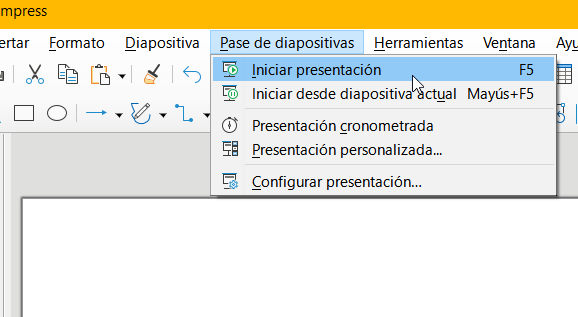
You can access directly by pressing F5 to start on the first slide or Shift+F5 to start from the current slide
To move through the slides, use the sliders.
TRANSITION BETWEEN SLIDES
To enhance the look of your presentation, you can define transitions between slides. There are two ways to do it:
Using the menu:
- Select the slide you want to transition to
- In the menu on the right
- Second Tool: Slide Transition
- Clicking on each one previews the action
- It is not necessary to click on accept
Using the toolbar:
- Click on the top menu Slide - Slide Transition
- The menu on the right appears displayed
- Clicking on each one previews the action
- It is not necessary to click on accept
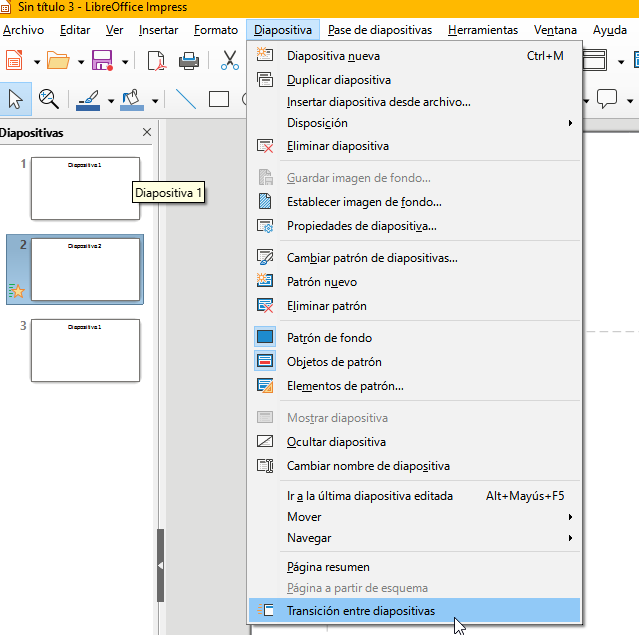
If you want to change the transition to another slide, click on it and use this menu that is already displayed on the right