
How to read a computer AD
How to read a computer AD
-
Intel Pentium 4 processor (3GHz, 800MHz FSB)
-
Mini-tower chassis
-
1GB dual channel DDR2 SDRAM
-
200GB Serial ATA hard drive (7200 r.p.m.)
-
128MB PCI-Express video card
-
Integrated audio
-
48X CD-RW drive
-
19" TFT flat panel XGA (1024 × 768) monitor
-
Microsoft Windows XP Professional
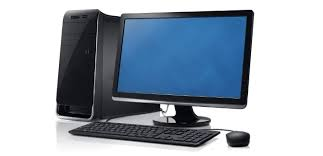
- Processor
- The main processing chip called a “Pentium 4”, designed and manufactured by Intel. It runs at 3 gigahertz and uses a front-side bus at 800 megahertz.
- Chassis
- A small, tall and narrow style of case containing the computer system.
- Memory (RAM)
- Synchronous dynamic random access memory with a capacity of one gigabyte; high-bandwidth, double-data-rate memory.
- Hard drive
- Capacity of two hundred gigabytes using Serial ATA (serial data connection rather than the original parallel connection); rotates at 7,200 revolutions per minute.
- Video card
- Electronics for driving the graphics output, with 128 megabytes of memory, using the PCI-Express interface.
- Audio
- Electronics for controlling the sound output that are built into the main electronics of the computer.
- Optical drive
- Compact disc read/write drive operating at forty-eight times the speed of the original CD drives.
- Monitor
- Nineteen-inch flat display screen made from thin-film transistors with a resolution of 1024 by 768.
- Operating system
- The software used to control the system: Microsoft Windows XP Professional.
Categories, units of measure and examples
|
Category |
What it measures |
Typical Unit(s) |
Example |
Explanation (simple English) |
|---|---|---|---|---|
|
Processor (CPU) |
Speed / frequency |
GHz (gigahertz) |
3.0 GHz |
The number of billions of cycles per second. The higher, the faster the processor. |
|
Memory (RAM) |
Temporary working memory |
GB (gigabytes) |
8 GB |
How much data the computer can handle at the same time. More RAM → better multitasking. |
|
Storage |
Permanent data capacity |
GB or TB (gigabytes / terabytes) |
512 GB SSD or 1 TB HDD |
Where programs and files are saved. SSD = faster, HDD = larger but slower. |
|
Graphics (GPU) |
Video memory (VRAM) |
GB (gigabytes) |
6 GB VRAM |
Amount of memory for images, video, or 3D games. |
|
Display / Monitor |
Screen size and resolution |
Inches (″) + pixels (e.g., 1920 × 1080) |
15.6″ Full HD |
The size of the screen and how clear the image is. |
|
Optical Drive |
Reading/writing speed |
x (speed multiplier) |
48× CD-RW |
“×” means times faster than the original CD speed. |
|
Battery (laptops) |
Battery life |
Hours (h) |
10 h |
How long the computer can run without charging. |
|
Weight (laptops) |
Portability |
kg / lb |
1.8 kg |
How heavy the computer is. |
|
Ports / Connectivity |
Transfer speed |
Gbps (gigabits per second) |
USB 3.0 = 5 Gbps |
How fast data moves between devices. |
|
Price |
Cost |
€ / $ |
€899 |
How much it costs (currency). |