UNIT 2 - Computer architecture
| Sitio: | AULA VIRTUAL do IES Ricardo Mella |
| Curso: | English_STI |
| Libro: | UNIT 2 - Computer architecture |
| Impreso por: | Guest user |
| Data: | venres, 15 de maio de 2026, 7:46 PM |
1. Starter
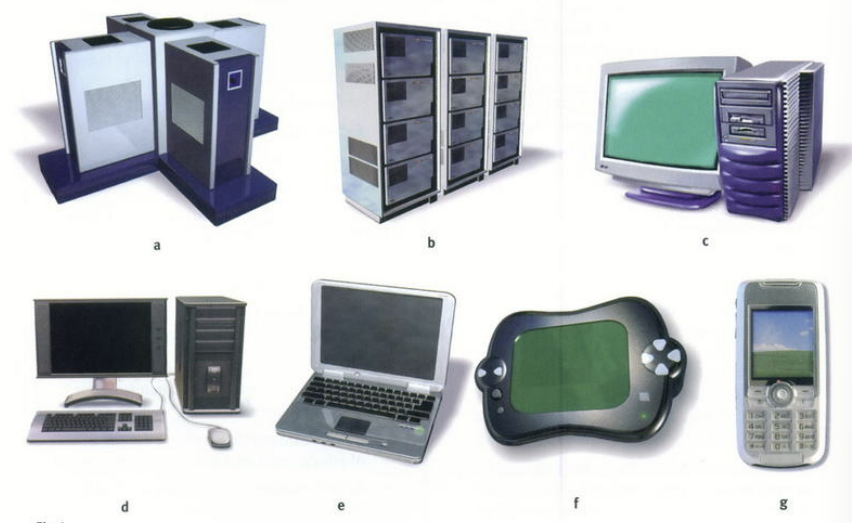
Name these different types of devices. Then match the possible users below to each type. Justify your choice.
- student using a computer for entertainment while travelling
- large company processing payroll data
- travelling salesperson giving marketing presentations
- large scientific organisation processing work on nuclear research
- businessperson keeping in touch with clients while travelling
- graphic designer
- secretary doing general office work
2. Devices
1a. Supercomputer
A supercomputer is the most powerful type of computer.
It can perform millions of calculations per second and is used for scientific research, weather forecasting, nuclear simulations, or space exploration.
Example: NASA or CERN use supercomputers.
b. Mainframe
A mainframe is a very large and expensive computer used by big companies or governments to process huge amounts of data — like payroll, banking transactions, or flight reservations.
Example: Banks use mainframes to manage accounts.
c. Workstation
A workstation is a high-performance computer for professionals who need more power than a normal PC — for example, graphic designers, architects, or engineers.
Example: A designer using AutoCAD or Photoshop.
d. Desktop
A desktop computer is the typical home or office PC, placed on a desk, with separate monitor, keyboard, and CPU.
Example: The computer you use at school or in an office.
e. Portable
A portable computer is designed to be moved easily. It usually refers to a laptop or notebook — smaller, lighter, and battery-powered.
Example: You take it to meetings or work remotely.
f. Pen-based computer
A pen-based computer uses a stylus (digital pen) instead of a keyboard. You can write or draw directly on the screen.
Example: A tablet or a device for surveys or signatures.
g. PDA (Personal Digital Assistant)
A PDA is a small handheld computer, popular before smartphones, used to manage contacts, calendars, and notes.
Example: PalmPilot or early HP iPAQ devices.
3. Match each item in Column A with its function in Column B.
| A – Item | B – Function |
|---|---|
| RAM | controls the cursor |
| processor | inputs data through keys like a typewriter |
| mouse | displays the output from a computer on a screen |
| clock | reads DVD-ROMs |
| flash memory key | reads and writes to electronic chips on a card |
| monitor | holds instructions which are needed to start up the computer |
| keyboard | holds data read or written to it by the processor |
| DVD-ROM drive | provides extremely fast access for sections of a program and its data |
| cache | controls the timing of signals in the computer |
| ROM | controls all the operations in a computer |
Show answers
| Item (A) | Correct Function (B) |
|---|---|
| RAM | holds data read or written to it by the processor |
| processor | controls all the operations in a computer |
| mouse | controls the cursor |
| clock | controls the timing of signals in the computer |
| flash memory key | reads and writes to electronic chips on a card |
| monitor | displays the output from a computer on a screen |
| keyboard | inputs data through keys like a typewriter |
| DVD-ROM drive | reads DVD-ROMs |
| cache | provides extremely fast access for sections of a program and its data |
| ROM | holds instructions which are needed to start up the computer |
4. How to read a computer AD
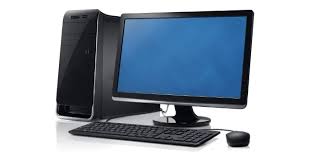
- Intel Pentium 4 processor (3GHz, 800MHz FSB)
- Mini-tower chassis
- 1GB dual channel DDR2 SDRAM
- 200GB Serial ATA hard drive (7200 r.p.m.)
- 128MB PCI-Express video card
- Integrated audio
- 48X CD-RW drive
- 19" TFT flat panel XGA (1024 × 768) monitor
- Microsoft Windows XP Professional
- Processor
- The main processing chip called a “Pentium 4”, designed and manufactured by Intel. It runs at 3 gigahertz and uses a front-side bus at 800 megahertz.
- Chassis
- A small, tall and narrow style of case containing the computer system.
- Memory (RAM)
- Synchronous dynamic random access memory with a capacity of one gigabyte; high-bandwidth, double-data-rate memory.
- Hard drive
- Capacity of two hundred gigabytes using Serial ATA (serial data connection rather than the original parallel connection); rotates at 7,200 revolutions per minute.
- Video card
- Electronics for driving the graphics output, with 128 megabytes of memory, using the PCI-Express interface.
- Audio
- Electronics for controlling the sound output that are built into the main electronics of the computer.
- Optical drive
- Compact disc read/write drive operating at forty-eight times the speed of the original CD drives.
- Monitor
- Nineteen-inch flat display screen made from thin-film transistors with a resolution of 1024 by 768.
- Operating system
- The software used to control the system: Microsoft Windows XP Professional.
5. Categories, units of measure and examples
| Category | What it measures | Typical Unit(s) | Example | Explanation (simple English) |
|---|---|---|---|---|
| Processor (CPU) | Speed / frequency | GHz (gigahertz) | 3.0 GHz | The number of billions of cycles per second. The higher, the faster the processor. |
| Memory (RAM) | Temporary working memory | GB (gigabytes) | 8 GB | How much data the computer can handle at the same time. More RAM → better multitasking. |
| Storage | Permanent data capacity | GB or TB (gigabytes / terabytes) | 512 GB SSD or 1 TB HDD | Where programs and files are saved. SSD = faster, HDD = larger but slower. |
| Graphics (GPU) | Video memory (VRAM) | GB (gigabytes) | 6 GB VRAM | Amount of memory for images, video, or 3D games. |
| Display / Monitor | Screen size and resolution | Inches (″) + pixels (e.g., 1920 × 1080) | 15.6″ Full HD | The size of the screen and how clear the image is. |
| Optical Drive | Reading/writing speed | x (speed multiplier) | 48× CD-RW | “×” means times faster than the original CD speed. |
| Battery (laptops) | Battery life | Hours (h) | 10 h | How long the computer can run without charging. |
| Weight (laptops) | Portability | kg / lb | 1.8 kg | How heavy the computer is. |
| Ports / Connectivity | Transfer speed | Gbps (gigabits per second) | USB 3.0 = 5 Gbps | How fast data moves between devices. |
| Price | Cost | € / $ | €899 | How much it costs (currency). |