
Basic Course A1 - Alicia Gil
Section outline
-
Here you'll find the extra material we see in class and some activities for extra practice. The outcome of this task will be a blog post on a pdf file with an image of some members of your family and their description. The complete instructions are going to be available at the task
Aquí atoparás o material extra que vemos en clase, e algunhas actividades para ter práctica extra. O traballo final desta tarefa será un post dun blog nun arquivo pdf cunha imaxe de algúns membros da túa familia e a súa descrición. As instrucións completas estarán dispoñibles na tarefa.
-
Students mustMake a submissionReceive a grade
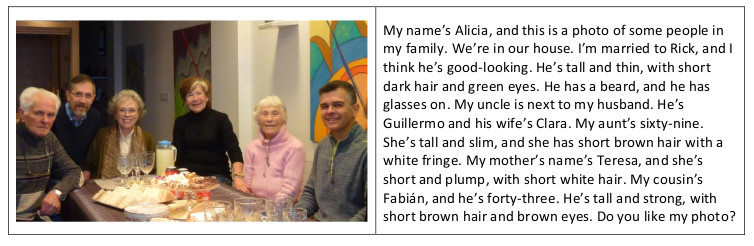
For this task, you want to post a description of your family with a photo on your blog. So you need an image of your family. If you don’t have a photo of your family to include in your writing, you’ll have to draw a picture of them or include an image from the Internet. Have a look at the basic model below (based on the texts on pages 47 and 148 in our textbook). Write a post including all of these points:
- Mention the place where you are in the photo.
- Write about the people in the photo: their names, your relationship and some of their ages.
- Describe the physical appearance of some of them to locate them in the photo.
To upload your pdf file with a text having the characteristics mentioned above, click on "Add Submission." Then, click on the arrow (if the arrow doesn't work, click on the left-hand top corner drawing of a file, which shows the word "Add..." when you place the cursor on it). After that, a new window appears, the "File Picker," and here, click on “Choose file” (if this doesn't appear, click on "Upload a file" on the left), and thus, you can see your computer files on the new window. Once you choose the file you want to submit, click on “Upload this file.” Finally, don’t forget to click “Save changes,” so that the file remains uploaded.