
Pros & cons - Smartphones - Argumentative essay
TIDYING UP YOUR DIGITAL LIFE
- Warming up-Speaking: Who has a far more organized digital life? Interview your partner or else tell us in 1'30" how tidy you are when it comes to your digital life.
- How many photos do you have on your phone? Are they organized into albums? How quickly could you find a photo you wanted to show someone?
- Do you have any apps on your phone that you never or hardly ever use?
- How many email accounts do you have? Approximately how many emails do you have in your inbox?
- How many songs do you have on your phone or MP3 player? How many of them do you listen to regularly?
- How many friends do you have on Facebook? How many of them are actually real friends?
- How many people in your 'contacts' have you not being in touch with in the last year?
- How many different passwords do you have? How do you remember them?
- What's the wallpaper on your phone or computer screen? Is it one your photos or did it come with the phone or device?
- How many digital devices do you have that you actually never use, e.g. old phones / cameras /MP3 players, etc.?
- Reading - Mediation: 11 ways to tidy up your digital life. Choose 3 of these tips you would consider your partner would benefit most from and in 2' maximum time, mediate them.
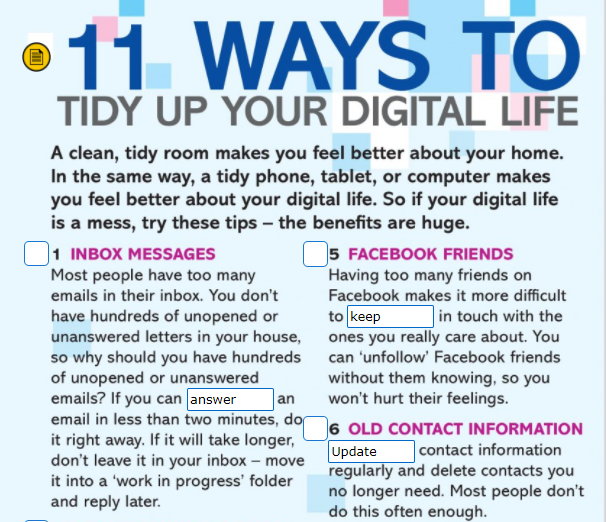
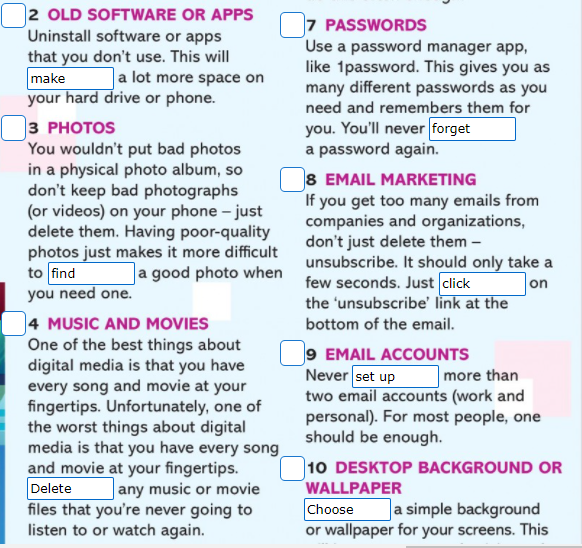
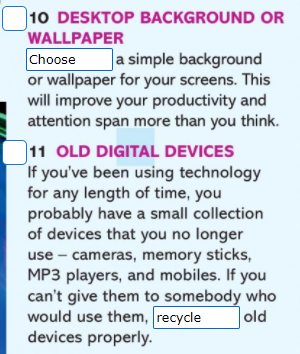
- MEDIATING: Let's practise all together now.
- INTRODUCTION: Let me give you some good advice to tidy up your digital life.
- When it comes to inbox messages, avoid leaving them unanswered or unopened, specially if you can answer them really quickly.
- It's no use having old and useless apps and programmes in your PC. Uninstall them and you'll benefit from lots of free space.
- It's not worth saving lots of poor-quality pics in your phone. This way, it'll take you ages to find a photo when you need it.
- Another thing you should try not to do is filling your phone with songs and movies that you're likely not to listen to or watch again.
- It's also no good having people you are not close to as friends in Facebook. Simply, unfollow them and pay attention to the ones you care about. I'm sure you'll be a lot happier.
- Why not use a password manager to remember all the multiple passwords we are used to typing every single day?
- In order to avoid your inbox getting full of clutter, instead of wasting your time deleting those mails, start considering unsubscribing.
- The less email accounts you set up, the easier it'll be for you to find your stuff.
- Having a simple wallpaper will help you to be far more efficient than you can expect.
- By recycling your old devices properly, you'll certainly be far more organized. This will definitely save you a lot of time and room.
- CONCLUSION:
- I'm positive you'll improve a great deal by following these pieces of advice and I dare say you won't regret following them.
- I'm sure if you follow these pieces of advice, you'll feel much more relieved as well as less stressed out.
You can try to mediate one of the tips below on your own, now that you've had plenty of practice.
11 tips to declutter your digital life
Are you feeling overwhelmed? You may be crazy busy in your business and the state of your computer, your emails and your digital life, in general, isn’t really helping? I have put together my top tips to declutter your digital life, so set aside some time, and tick things off one at a time.
Clean up your desktop
How many files do you have just sitting on your desktop? Those ones you saved there because it was easy at the time? Go ahead and file them. Whether that’s into the appropriate folders on your computer, in the cloud, or in the trash, move those files somewhere else that makes sense and leave your desktop feeling clean and clutter free.
Empty your inbox
There are two types of people when it comes to emails. Those who have hundreds or thousands of emails in their inbox at any given time, and those who read a new email and immediately file it just to make it go away. If you’re the former, now’s the time to clean your inbox.
As you’re doing this, take the time to unsubscribe from emails you don’t want or need anymore. If you find you get lots of emails from one company and you want to delete them, search for the company name within your inbox and do a bulk deletion at one time. Need a hand to unsubscribe? Check out Unroll.me to make unsubscribing quick and easy.
Top Tip: if your mail server is filing up and you need to make space – you’ll achieve this much more quickly by using the search function and filtering by email size and deleting 50 largest emails (once you’ve saved the necessary files, of course), rather than trawling through hundreds of little emails.
Close the tabs
How many tabs do you have open on your internet browser right now? Or how many windows? The answer is likely more than one. In the interest of transparency – I have one window with 9 tabs, another window with one tab, and another window with two tabs. Close the ones you’re not using, read the ones you’ve kept open until you have some free time, and get those tabs down to a manageable amount that no longer feels overwhelming.
Back up in the cloud
Save space on your computer by using a cloud storage system like Dropbox, Google Drive, iCloud or OneDrive (among others). These give you the ability to access your documents from any location with internet access and provide you with the assurance that if anything happens to your computer, you won’t lose your files.
As an added bonus, having your files in the cloud will make it heaps easier when you’re working with a Virtual Assistant and you both need to access the same file – you’ll both always have access to the latest version.
Get rid of notifications
Be honest, how often do you pull out your phone the moment you get a notification? Best solution to that? Remove the notifications! You can still check your emails, Facebook or any other apps, any time you like, you just don’t get notified when you have something new. This will help you to stay focused, and then you can take time out to check all your applications when you need a break or have completed the task. If you have notifications on your computer – do the same thing!
Empty your recycle bin
When was the last time you emptied your recycle bin on your computer? How many files are their currently in your recycle bin? I just emptied mine (and I do it relatively regularly – monthly/bi-monthly) and there were over 2,000 files. It’s one of those functions that gets used often (delete!), but the next stage of permanent deletion from the device doesn’t often happen. So go and hit delete, and see how much space you get back!
Clear out your downloads folder
Similar to your recycle bin, the downloads folder is one that is often used but rarely cleared. Go through and work out what you need and don’t need. If you’re keeping it – file it appropriately. If you’re getting rid of it – move it to the recycle bin. And then don’t forget to go back and empty your recycle bin again.
Minimise your device apps
Search through the apps on your phone ortablet and take a look at what you have on there. How many do you use regularly and what can go? The less you have on your phone or tablet, the less cluttered it will feel. At the very least, sort your apps into folders, so you don’t have to scroll through 17 pages of apps to find the one you’re looking for.
By way of example, the folders I have on my phone are:
- Utilities – this is banking apps, calculators, maps, etc.
- Photography – any camera or camera roll related apps
- Entertainment – any games, social media, cinema apps
- Health – Fitbit, health tracking, calorie conversion apps
- Shopping – loyalty apps (mainly food related)
- Work – these are the apps for all of the software platforms I use that also have an app option – LastPass, Asana, MailChimp, Xero, etc.
- Apple apps – all those annoying apps that Apple preloads onto your phone that you can’t get rid of – I’ve hidden them away on another page so they don’t bother me
- Misc – anything that doesn’t fit into any of the above categories
- I also leave my key ‘go-to’ apps on the main screen – these are my phone, emails, contacts, Spotify, Facebook, calendar, camera, etc.
Rearrange your folders
Are you constantly searching for documents that you know you’ve filed somewhere but can’t work out where? Chances are your filing system needs an overhaul. Think about what makes sense to you and what works for you, and start again. It might be time-consuming to set up, but once it’s done you’ll feel much better for it and save a lot of time moving forward.
Simplify your social media
Facebook can take up far more time than it should, so remove yourself from groups you no longer care about or turn off the notifications, unlike pages that aren’t of interest, and even remove friends you’re no longer in contact with. If you saw someone walking down the street and wouldn’t say hi, chances are they shouldn’t be on your friends list. Want to keep someone as a friend but don’t want them showing up in your newsfeed? Simply unfollow them instead. Same goes for Instagram, Twitter and anything else you’re on. If you don’t want to see their stuff anymore, just unfollow them. Done. Now you know when you log in, you’ll be seeing more of the information you really care about.
In short
Yes, some of these tips are going to take you a little time, but overall you’ll be gaining time by having a streamlined and effective system that works for you. You’ll feel less cluttered and more minimalistic, allowing you a freedom from the constraints of technology. Declutter your digital life today!
One more tip? Try and get offline as much as possible. The digital world will still be there when you’re back from the real world!
- Writing: An argumentative essay - For and agains essays - SMARTPHONES
- Step 1: edit this text (spot the grammar, punctuation, vocabulary and spelling mistakes).
- Step 2: jot down the pros & cons of Wikipedia mentioned in the text.
- Step 3: write a similar article about smartphones.
- Most people today have a smartphone. But are they really essential for modern life? Let's examine both its advantages and disadvantages.
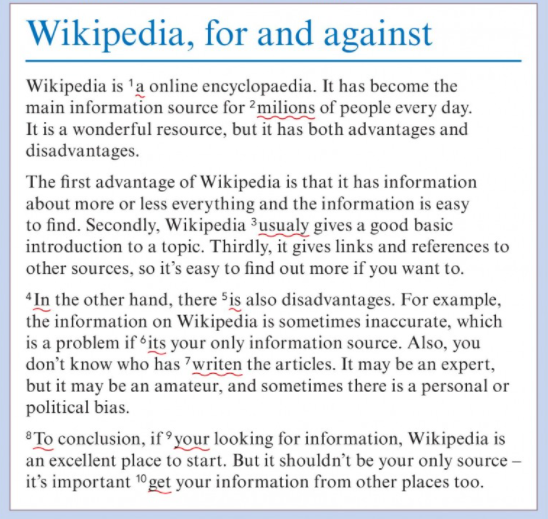
- WRITING - REVISION: An argumentative essay: Wikipedia: a reliable or biased source of information? - Page 195.
- Edit your text part. SS A will be in charge of spotting and self-correcting while talking at the time s/he uses connected speech paragraphs 1 and 2 whereas SS B will do so with paragraphs 3 and 4. Any time you spot an error utter the sentence: "That must have been a typo/slip of the hand. I meant x/I should have said x"
- While you listen to your partner jot down the advantages/disadvantages mentioned by your partner.
- It's now time to rewrite the text using level stuff and upgrading it to make it a lot better as regards variety of structures and lexical items. The introduction is given as an example.
SAMPLE INTRO: Wikipedia is an online encyclopaedia. Noone dares deny it's becoming commoner and commoner to look for information in this website. Despite being a wonderful resource, for every plus there is a minus.
ADVANTAGES -PARAGRAPH 1: One point in favour of Wikipedia would be its simplicity. Never before has it been so easy and fast to find information about any given topic. Another important argument in favour of this wonderful source of information would be that it offers great basic information. Everybody would agree if you know nothing about a topic, this is a great starting point. Furthermore, to deepen your understanding of any area, in this site you'll find plenty of links and references to other sources.
DISADVANTAGES -PARAGRAPH 2: In spite of being such an appealing source of information for your next assignment or simply to get the gist of any topic which grabs your attention, I recommend you to be extra careful, as it might not be as accurate as you would expect. Another drawback is that anybody can actually add information, varying from experts to amateurs, which might also result in biased or unreliable information.
CONCLUSION: Don't get me wrong. I do admit Wikipedia is an excellent place to start looking for information as long as you are aware of the importance of getting your information from other additional sources. You know what they say: "Variety adds spice to life"
- Practice makes perfect! An argumentative essay: Smartphones: A blessing or a curse? Where do you stand on this? Mention at least 2/3 advantages and disadvantages of smartphones! Write a vivid introduction to grab the readers attention. Do not forget to summarise the body in your conclusion.
SAMPLE INTRO: We cannot fail to consider how important smartphones are in our daily lifes. Most of us would certainly hit the roof if we are suddenly deprived of these devices for a few hours, not to mention for a couple of days. No one dares deny they are a really useful and helpful tool but are we really aware of how addicted we have become?
ADVANTAGES -PARAGRAPH 1:
DISADVANTAGES -PARAGRAPH 2:
CONCLUSION:
- The smartphone problem: Word formation - Listening - Speaking + Levelling up.